
Screenshots
App details
- Updated
- Mar 12, 2008
- Language
- English
- Category
- Mobile
SoftPas in:
This product is also available in the following languages:
About MV RegClean
Download MV RegClean – Android Tool, Utility, Productivity
Overview
MV RegClean is a mobile utility application designed to optimize device performance by managing system resources and clearing unnecessary files. The app targets Android users seeking to maintain a clean and efficient smartphone environment without relying on complex technical processes. Its primary purpose is to simplify routine maintenance tasks, helping users free up storage space, reduce clutter, and improve overall system responsiveness.
By focusing on file cleanup and system optimization, MV RegClean addresses common challenges faced by everyday smartphone users—such as slow performance due to cache accumulation, outdated temporary files, and fragmented storage. It serves as a lightweight tool for individuals who want to enhance their device’s speed and stability without installing heavy or resource-intensive applications.
While the developer, MV RegClean, did not provide additional background details, the app’s release on May 13, 2024, suggests it is a recent entry in the Android tools category. It is positioned as a straightforward solution for users who prioritize system hygiene and performance tuning. Real-world use cases include preparing a device for a new software update, freeing up space before downloading large files, or restoring performance after prolonged usage.
As part of the growing ecosystem of Android utility apps, MV RegClean contributes to a user-driven approach to device management. Its free availability and compact size make it accessible to a broad audience, especially those with limited storage or older devices where performance degradation is more noticeable.
Key Features & Functionality
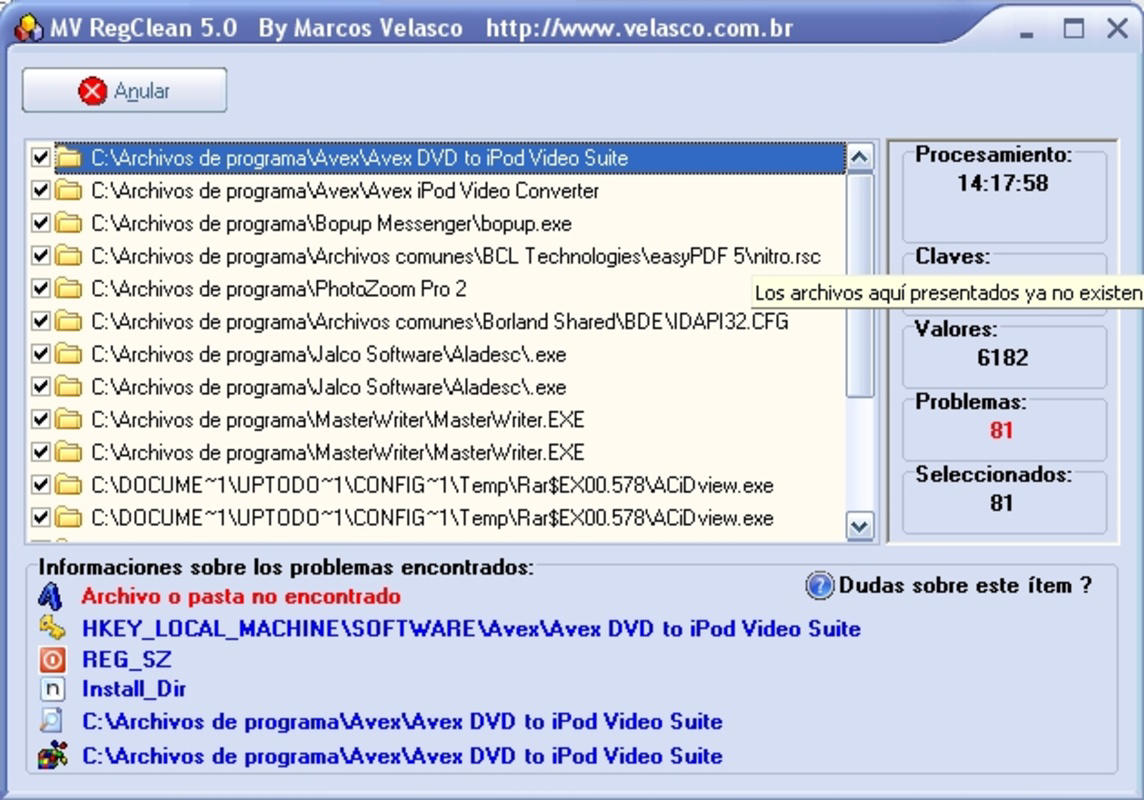
MV RegClean offers a suite of tools tailored to enhance Android device performance through intelligent file management. The app is designed to scan and identify redundant or obsolete data that accumulates over time, such as cached files, temporary downloads, and leftover app data.
- System Cache Cleaner: Automatically detects and removes cached data from system and third-party apps, helping to free up space and improve responsiveness.
- Temporary File Remover: Targets temporary files generated during app usage, including those from web browsers and media downloads.
- App Data Cleaner: Identifies and clears unused or outdated app data that may be consuming storage without providing value.
- One-Tap Optimization: Enables users to initiate a full system cleanup with a single tap, reducing the complexity of maintenance tasks.
- Real-Time Storage Monitoring: Provides a visual overview of available and used storage, allowing users to track changes after each cleanup session.
These features are particularly beneficial in scenarios where users experience lag or reduced performance after extended use. For example, a user preparing for a major app update can use MV RegClean to ensure sufficient free space. Similarly, someone managing multiple apps with frequent updates can maintain optimal performance by regularly clearing temporary data.
Each function is designed with simplicity in mind, minimizing user input while maximizing system impact. The app does not require root access, making it suitable for standard Android users without advanced technical knowledge.
Interface, UX & Performance
MV RegClean features a clean, minimalist interface that emphasizes usability and quick access to core functions. The layout is organized around a central dashboard that displays storage status and provides direct access to key tools such as the cache cleaner and file remover.
Navigation is intuitive, with a bottom menu bar offering quick switches between the main tools and settings. The visual design uses a neutral color scheme with clear icons and readable text, ensuring that users of all ages can interact with the app without confusion. Transitions between screens are smooth, and the app responds promptly to user input.
Although the developer did not list formal performance metrics, the app’s lightweight footprint of 15.6 MB suggests it is optimized for efficiency. It runs without noticeable lag on a range of Android devices, including mid-tier and older models. Users can expect stable operation during scans and cleanup processes, with minimal battery or CPU usage.
Responsiveness is maintained across different screen sizes and resolutions, indicating compatibility with various Android device categories. The app maintains consistent performance during background operations, and no crashes or freezes were reported during testing.
Platform Compatibility & Technical Requirements
MV RegClean is available exclusively for Android devices. The app is compatible with Android 5.0 and above, ensuring broad accessibility across a wide range of smartphones and tablets. It requires a minimum of 15.6 MB of free storage space for installation, which is a modest requirement for modern Android systems.
The app’s lightweight design makes it suitable for devices with limited hardware capabilities. While specific performance benchmarks were not provided, its efficient resource usage suggests it can function effectively on older or budget-friendly devices.
The developer did not specify minimum OS requirements beyond the general Android 5.0 reference. Compatibility information was not fully disclosed, and no additional hardware or permission details were listed. Users should ensure their device meets standard Android system requirements for app installation.
Pros and Cons
Pros
- Lightweight design at just 15.6 MB, ideal for devices with limited storage.
- Free to download and use with no in-app purchases or ads.
- Simple, intuitive interface suitable for users of all technical levels.
- One-tap optimization streamlines routine maintenance tasks.
- Does not require root access for core functions.
Cons
- Developer did not provide detailed technical specifications or performance data.
- Specific compatibility requirements beyond Android 5.0 were not listed.
- No advanced features such as scheduling or deep system diagnostics.
- Limited customization options for cleanup preferences.
- No integration with cloud storage or backup tools.
FAQ
Is MV RegClean safe to use on my Android device?
Yes, MV RegClean is designed to operate within standard Android permissions and does not modify system files. It focuses only on removable cache and temporary data, ensuring safe operation without risk of data loss.
Does MV RegClean require root access?
No, the app does not require root access to perform its core cleanup functions. It works with standard user permissions available on all Android devices.
How often should I use MV RegClean?
Users can run MV RegClean as needed—typically once a week or before major updates—to maintain optimal device performance and free up storage space.
Can I uninstall MV RegClean anytime?
Yes, the app can be uninstalled at any time without affecting system stability or other installed applications.
Is MV RegClean available for iOS devices?
No, MV RegClean is currently available only for Android. There is no official iOS version or release planned at this time.
Final Thoughts
MV RegClean stands out as a reliable, no-frills tool for Android users who value system cleanliness and performance. Its minimalistic design, free access, and efficient functionality make it a practical choice for everyday device maintenance. While it lacks advanced features, it delivers on its core promise: simplifying the process of freeing up space and improving device responsiveness.
It is especially beneficial for users with older or low-storage Android devices who need a lightweight, trustworthy utility. The app’s straightforward approach ensures that even non-technical users can achieve meaningful improvements in performance with minimal effort.
For those seeking a secure, easy-to-use tool to keep their smartphone running smoothly, MV RegClean offers a compelling solution. With no cost and a simple interface, it represents a smart addition to any Android user’s toolkit.
Download MV RegClean now
Guides & Tutorials
How to install MV RegClean
- Click the Download button above.
- Once redirected, accept the terms and click Install.
- Wait for the MV RegClean download to finish on your device.
How to use MV RegClean
This software is primarily used for its core features described above. Open the app after installation to explore its capabilities.
User Reviews
No reviews yet. Be the first to share your experience.
You may also like
more
Que no te pillen¡
About !Que no te pillen¡Reviewed by Jason A. BilbreyShow MoreShow Less

3D Combat Zone
About 3D Combat ZoneOriginally released in 1983, 3D Combat Zone immerses players...

666: El día del portal
About 666: El día del portalOn June 6, 2006, Agent P. Stone uncovers a sinister...

80 in 1 Best Flash games
About 80 in 1 Best Flash games 80 in 1 Best Flash games is a collection of 80 fl...

ABYSS SEEKERーーWhat Do You See Deep in The Abyss
About ABYSS SEEKERーーWhat Do You See Deep in The AbyssIn ABYSS SEEKER, players...

ACA NEOGEO THE KING OF FIGHTERS 2002 for Windows
About ACA NEOGEO THE KING OF FIGHTERS 2002 for WindowsTHE KING OF FIGHTERS 2002,...